Automated testing is one of the primary focuses of PostuLatte. The main entities of a test include: Testing Template → Test Scenario → Test → Test Step → Test Report.
Testing template includes a test scenario, testing notes, files, and other settings required to manage tests within the scenario.
Test scenario is a script that contains the logic for one or more tests. PostuLatte provides flexibility, allowing you to choose the most convenient way to write your tests. Typically, a test scenario corresponds to a specific functional feature and covers both positive and negative test cases.
Test is the logic executed within the Testing() method. A single scenario can include multiple tests. Tests can also be separated into individual methods or snippets for better organization and reusability.
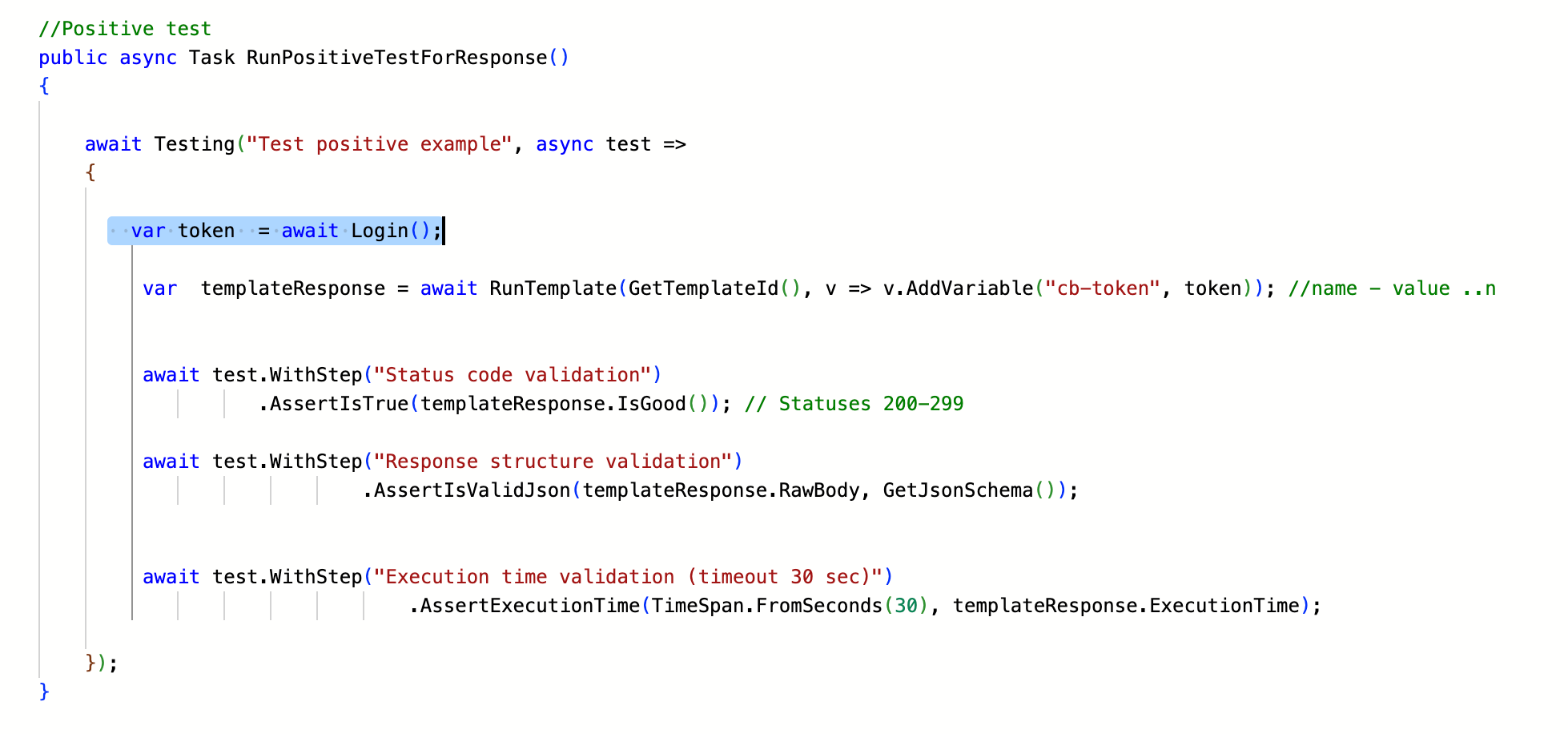
Test step is a checkpoint within a test associated with a validation. A step can be named using the WithStep method or automatically inherit the name of the validation.
The number of test steps within a single test is unlimited. However, each step must conclude with a assertion result: Success, Warning, or Error.
The final result of the test depends on the outcomes of all steps. If even one step ends with an Error, the overall test status will also be marked as failed.
To cover a request with a test, you need to create a testing template via the menu: "Manage elements → Create test template".
For tests, three tabs are available:
- Testing Notes – Used for maintaining documentation related to the test
- Scripting – Contains the entire logic of the test
- Files – Designed for storing files linked to the test, such as test data
Here’s an example of a simple test in PostuLatte. This test was generated from the response of a Query Template:
c#/*

This is an example of a simple test that verifies the response structure and status codes. Such a test can be created using code generation tools:
(Code editor -> Tools -> Code generation -> !!Insert server response into Input Data!! -> Json Data to Simple Response Test (C#) -> Convert).

The test makes a call to the target request using the Query method, passing the PublicID of the request as an argument.
It then performs checks on the status code and the response structure.

For a negative test, data in the request body, headers, or parameters is intentionally modified by changing variable values (using the AddVariable method).
This ensures that the target request is executed with incorrect input data.
The expected result of such a test is a server response with a status code indicating a client error.
The tests also verify the response time.

*/

//entry point
public async Task RunTests()
{
    // positive test
    await RunPositiveTestForResponse();
    // negative test
    await RunNegativeTestForResponse();
}

//Testing query PublicID
private string GetQueryId() => "PUT_YOUR_TEMPLATE_ID_HERE";


//Positive test
public async Task RunPositiveTestForResponse()
{
    await Testing("Test positive example", async test =>. // Definition of the testing scope with name "Test positive example"
    {
         var  templateResponse = await Query(GetQueryId()); // Call to the tested query


         await test.WithStep("Status code validation") // Definition of a testing step with name "Status code validation"
                   .AssertIsTrue(templateResponse.IsGood()); //Status code validation -  Statuses 400-499

         await test.WithStep("Response structure validation") // Definition of a testing step with name "Response structure validation"
                            .AssertIsValidJson(templateResponse.RawBody, GetJsonSchema()); // Validation of the response structure against a JSON schema


         await test.WithStep("Execution time validation (timeout 30 sec)")  // Definition of a testing step with name "Execution time validation (timeout 30 sec)"
                                .AssertExecutionTime(TimeSpan.FromSeconds(30), templateResponse.ExecutionTime); // Execution time validation

    });
}

//Negative test
public async Task RunNegativeTestForResponse()
{
    await Testing("Test negative example", async test => // Definition of the testing scope with name "Test negative example"
    {

      var  templateResponse = await Query(GetQueryId(), // Call to the tested query
                                              v=> v.AddVariable("PARAMETER_A","WRONG_VALUE_1"),  // Setting incorrect parameters to trigger a client error
                                              v=> v.AddVariable("PARAMETER_B","WRONG_VALUE_2"),  // Setting incorrect parameters to trigger a client error
                                              v=> v.AddVariable("PARAMTER_C","WRONG_VALUE_3"));  // Setting incorrect parameters to trigger a client error

          await test.WithStep("Status code validation") // Definition of a testing step with name "Status code validation"
                               .AssertIsTrue(templateResponse.IsClientErrors()); // Status code validation -  Statuses 400-499

          await test.WithStep("Execution time validation (timeout 30 sec)")  // Definition of a testing step with name "Execution time validation (timeout 30 sec)"
                                  .AssertExecutionTime(TimeSpan.FromSeconds(30), templateResponse.ExecutionTime); // Execution time validation

    });
}

public string GetJsonSchema() => "PUT YOUR JSON SCHEMA HERE"; // JSON Schema
The core structure for tests in PostuLatte is the Testing() method, which defines the test itself. By calling this method, you set the test name and gain access to tools for performing assertions.
Additionally, using the Testing() method automatically generates diagrams and statistics for the test in the Testing & Analytics tab, providing a convenient overview of the results.
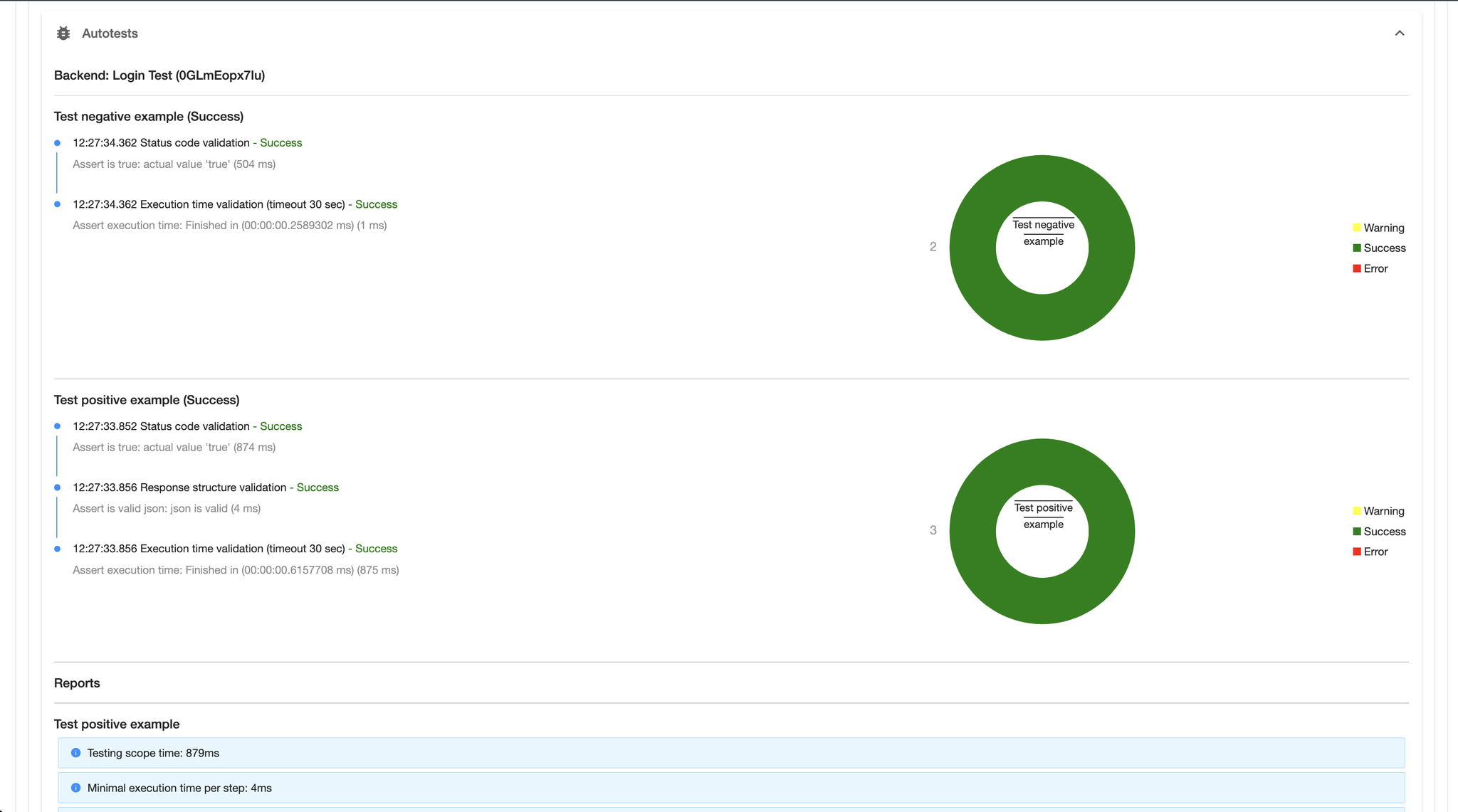
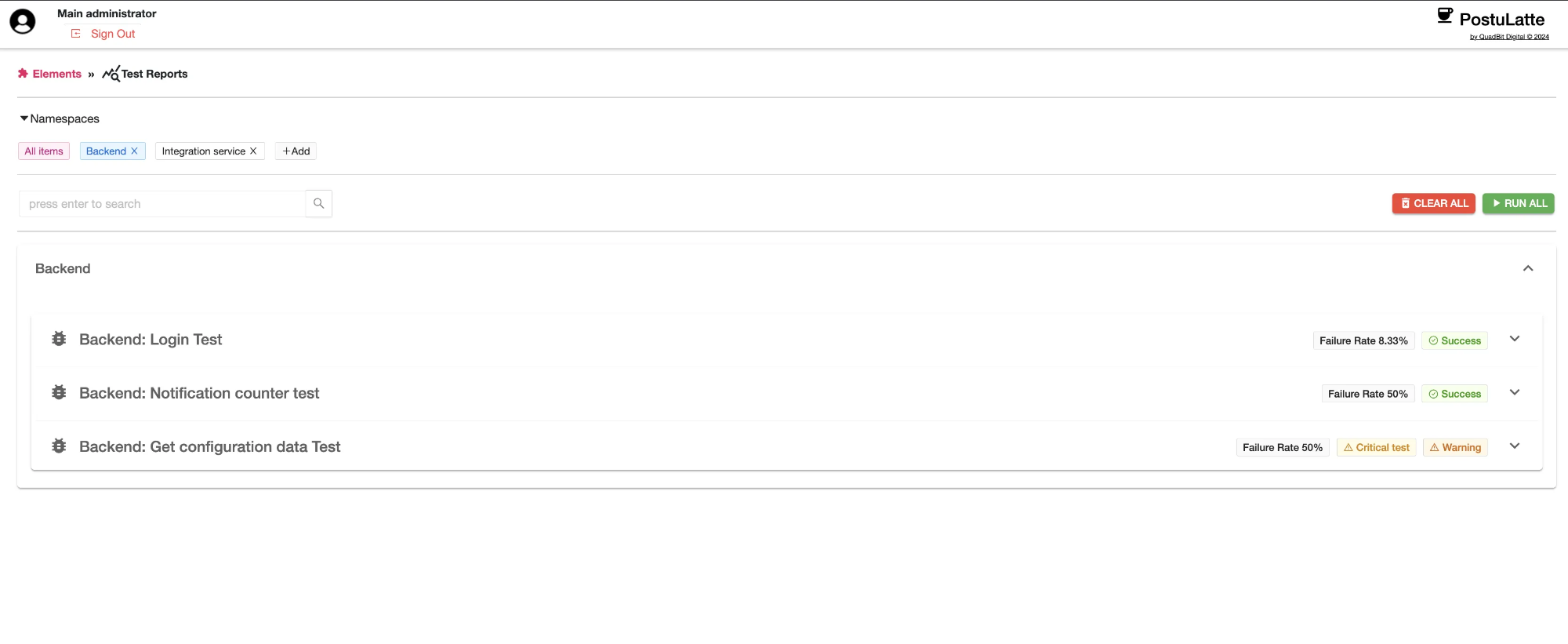
The created tests are also displayed in the Testing Reports section, where the test results are stored. Over time, this section builds a summary report, offering a detailed analysis of the conducted tests.
Testing reports are generated based on basic metrics and test results. Additionally, PostuLatte allows for extending these reports using auxiliary methods like Report() and ItIsCriticalTest.
Report() This method enables the inclusion of custom metrics in the report.
Parameters:
metricName (string): The name of the metric.
metricValue (object): The value of the metric.
unitName (string): The name of the measurement unit.
isPositiveTrend (bool): Indicates whether the trend is positive or negative.
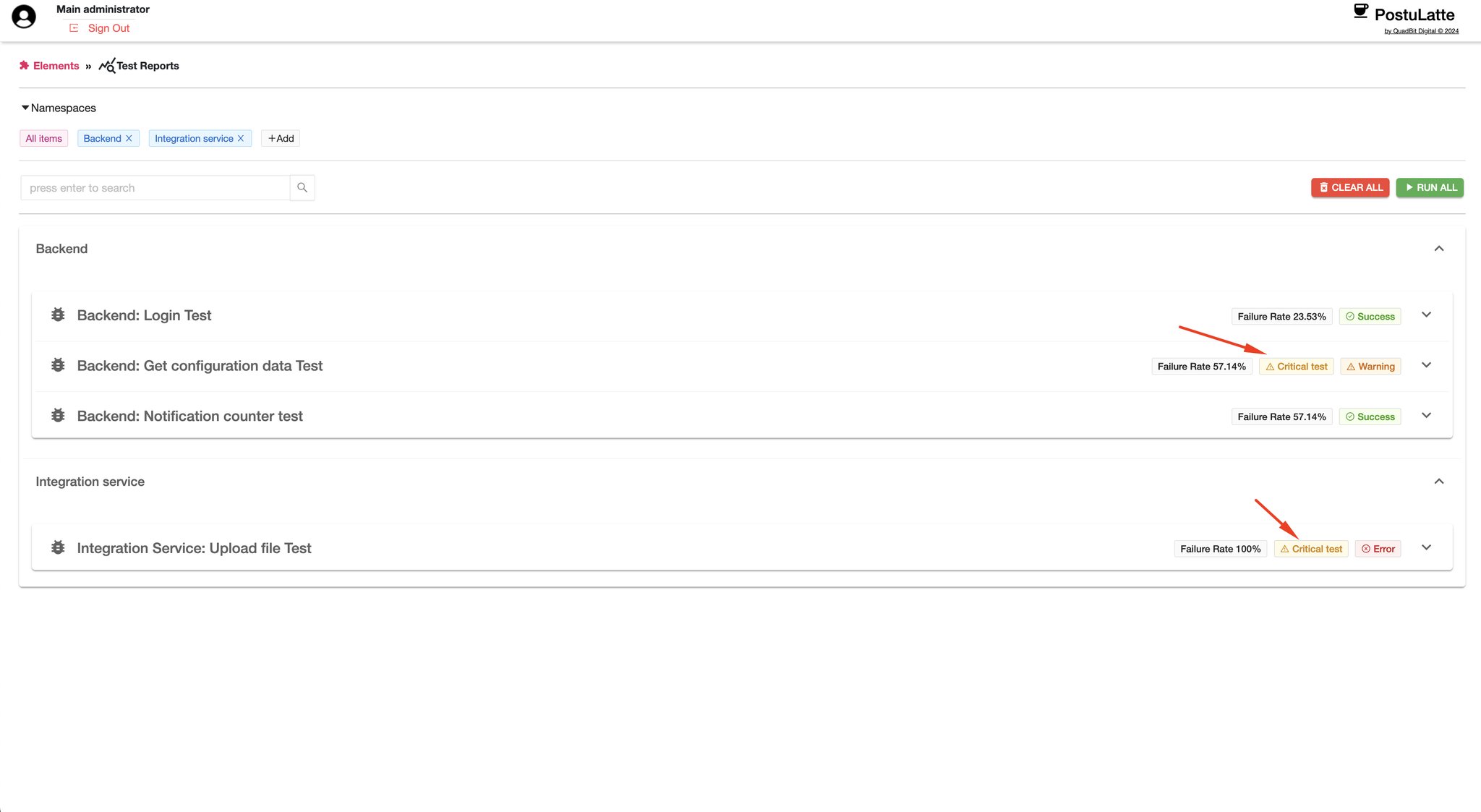
ItIsCriticalTest This method designates a test as critical, ensuring it is highlighted in reports and given priority during test result analysis. Calling this method within the testing context adds a distinct Critical label in the Testing Reports section interface. Additionally, the method informs the testing subsystem that all unhandled exceptions within the scope of this test should be explicitly highlighted in the report.
The user can also manage the test result using auxiliary methods: Success, Warning, and Fail. Each of these methods allows you to manually define the test outcome.
Success() Marks the test step or test as successful.
Warning() Marks the test step or test with a warning status, indicating potential issues without failing the test.
Fail() Marks the test step or test as failed, overriding any other results and ensuring the test is recorded as unsuccessful.
Scripting
PostuLatte offers a range of script engine functions to simplify writing test scenarios.
General Functions
- Execution Functions
- Resource Access Functions
- JSON Manipulation Functions
- Output Functions
Test Functions
- Assertions
- Fakers
- Test Step Management Functions
- HTTP Response Wrappers
Type | Methods | Scope |
Execution Functions | - RunTemplate(string templatePublicId, params Action<IVariablesSet>[] variables) - Query(string templatePublicId, params Action<IVariablesSet>[] variables) - Test(string templatePublicId, params Action<IVariablesSet>[] variables) | General |
Resource Access Functions | - Variable(string variableName), - Snippet(string snippetPublicId), - File(string fileName) | General |
JSON Manipulation Functions | - IsJson(string source), - Serialize(object obj, Formatting formatting), - Deserialize<T>(string line, JsonSerializerSettings settings), - JsonSchema<T>(), -JsonSchema(Type type), - JsonSchema(string json) | General |
Output Functions | - Log(object obj) - Log(object obj) | General |
Test Functions | - AssertAreEqual, - AssertAreNotEqual, - AssertIsTrue, - AssertIsFalse, - AssertExecutionTime, - AssertIsNull, - AssertIsNotNull, - AssertIsNotEmpty, - AssertIsEmpty, - AssertIsValidJson<T>, - AssertIsValidJson(string json, string jsonSchema) | Testing ScopeExample: await Testing("test example", async test =>{ await test.AssertIsTrue(true); }); |
Fakers | UseFaker(), UseFaker<TR>() — methods from the classes FakeContainer and FakeContainer<TR>:Setup, FakeObject, FakeCollection. | Testing Scope / General |
Test Step Management Functions | Methods from TestingScope: - Step - WithStep - Report - Fail - Success - Warning - ItIsCriticalTest | Testing Scope / General |
HTTP Response Wrappers | - IsInfos() - IsRedirects() - IsClientErrors() - IsServerErrors() - IsBad() - IsGood() - IsOk() - IsBadRequest() - IsNotFound() - IsForbidden() - IsUnauthorized() - GetResponseType(int status) - GetResponseBody() | ResponseModel |
Execution Functions
Execution functions are designed to execute various testing templates or query templates.
RunTemplate()
The RunTemplate method executes any template. As a parameter, it accepts an array of Action<IVariablesSet>, which is responsible for actions on variables, such as adding or modifying them. This allows you to execute any template while overriding or adding variables. This is particularly useful in testing scenarios, where you might want to test a request with one set of variables and then perform a negative test by providing another set of variables.
c#//Positive
var positiveResponse = await RunTemplate("TemplateID", v=>v.AddVariable("token",token));
//Negative
var negativeResponse = await RunTemplate("TemplateID", v=>v.AddVariable("wrongToken","XYNYX"));
The RunTemplate method returns a ResponseModel, which provides information about the status code, response body, headers, and more.
ResponseModel
c#public interface IResponseModel
{
    /// <summary>
    /// Response as is
    /// </summary>
    HttpResponseMessage Response { get; set; }

    /// <summary>
    /// Response headers wrapped in HeaderModel
    /// </summary>
    List<HeaderModel> ResponseHeader { get; set; }

    /// <summary>
    /// Response cookies wrapped in HeaderModel
    /// </summary>
    List<CookiesModel> ResponseCookies { get; set; }

    /// <summary>
    /// Stores statistical information about the execution of a query/test.
    /// </summary>
    IStatistics Statistics { get; set; }

    /// <summary>
    /// Stores instance of source template
    /// </summary>
    TemplateModel Template { get; set; }

    /// <summary>
    /// Execution time since start request
    /// </summary>
    TimeSpan ExecutionTime { get; set; }

    /// <summary>
    /// Stores information about an error, in case it occurs.
    /// </summary>
    Exception Exception { get; set; }

    /// <summary>
    /// Part of statistics info - processing output
    /// </summary>
    string QueryOutput { get; set; }

    /// <summary>
    /// Status code in int
    /// </summary>
    int Status { get; }

    /// <summary>
    /// Body RAW
    /// </summary>
    string RawBody { get; }

    /// <summary>
    /// Check if the status code belongs to the category: Info
    /// Status >= 100 and Status < 200
    /// </summary>
    /// <returns></returns>
    bool IsInfos();

    /// <summary>
    /// Check if the status code belongs to the category: Redirects
    /// Status >= 300 and Status < 400
    /// </summary>
    /// <returns></returns>
    bool IsRedirects();

    /// <summary>
    /// Check if the status code belongs to the category: Client Errors
    /// Status >= 400 and Status < 500
    /// </summary>
    /// <returns></returns>
    bool IsClientErrors();

    /// <summary>
    /// Check if the status code belongs to the category: Server Errors
    /// Status >= 500 and Status < 600
    /// </summary>
    /// <returns></returns>
    bool IsServerErrors();

    /// <summary>
    /// Check if the status code belongs to the category: Bad (For Lazy)
    /// Status >= 400 and Status < 600
    /// </summary>
    /// <returns></returns>
    bool IsBad();

    /// <summary>
    /// Check if the status code belongs to the category: Good (For Lazy)
    /// Status >= 200 and Status < 300
    /// </summary>
    /// <returns></returns>
    bool IsGood();

    /// <summary>
    /// Check if the status code equals 200
    /// </summary>
    /// <returns></returns>
    bool IsOk();

    /// <summary>
    /// Check if the status code equals 400
    /// </summary>
    /// <returns></returns>
    bool IsBadRequest();

    /// <summary>
    /// Check if the status code equals 404
    /// </summary>
    /// <returns></returns>
    bool IsNotFound();

    /// <summary>
    /// Check if the status code equals 403
    /// </summary>
    /// <returns></returns>
    bool IsForbidden();

    /// <summary>
    /// Check if the status code equals 401
    /// </summary>
    /// <returns></returns>
    bool IsUnauthorized();

    /// <summary>
    /// The method returns the raw data of the response body.
    /// </summary>
    /// <returns></returns>
    Task<JModel> GetBodyRawData();
}
Query()
The Test() and Query() methods perform the same functions as RunTemplate, but with type checking for the template. If a request template's PublicId is passed to the Test() method, an exception will be thrown. The Query() method works similarly.
Test()
The Test() and Query() methods perform the same functions as RunTemplate, but with type checking for the template. If a request template's PublicId is passed to the Test() method, an exception will be thrown. The Query() method works similarly.
Resource Access Functions
Variable()
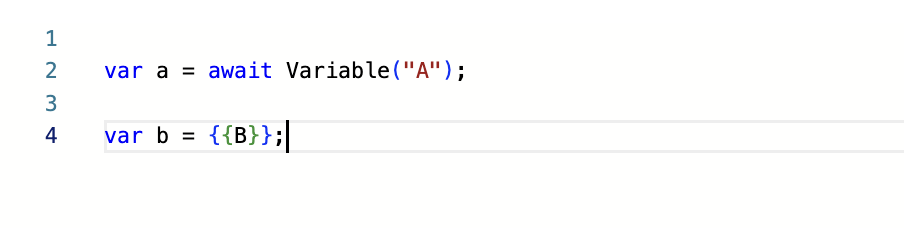
Variable is a method from the resource access category that returns the value of a variable as a string. Additionally, you can retrieve the value of a variable using the directive {{variableName}} directly in the code. This approach also allows the variable to be used immediately in the required format without additional conversion.
Snippet()
Snippet is a method that returns the value of a snippet. The search is performed by function name or PublicId. This method is useful, for example, for storing JSON schemas or other large text documents.
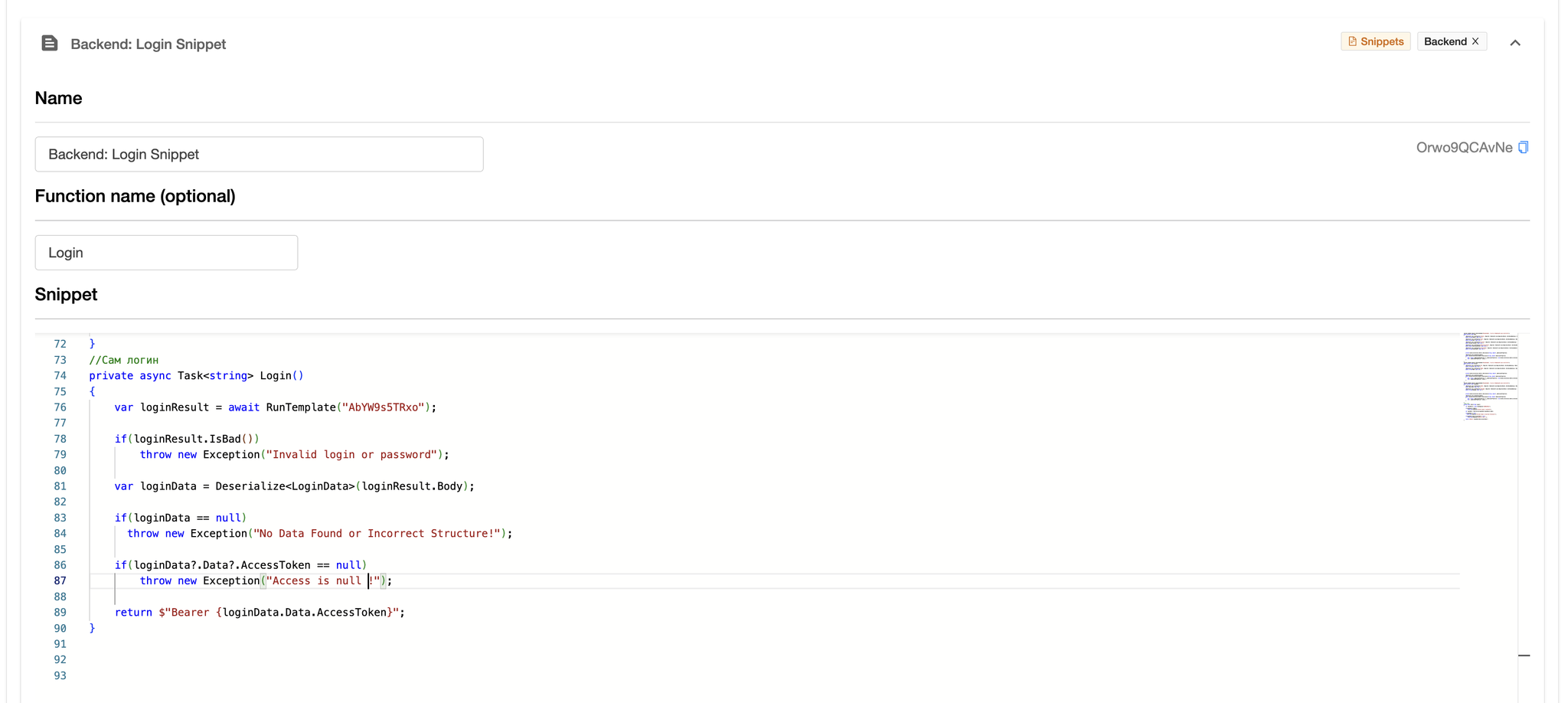
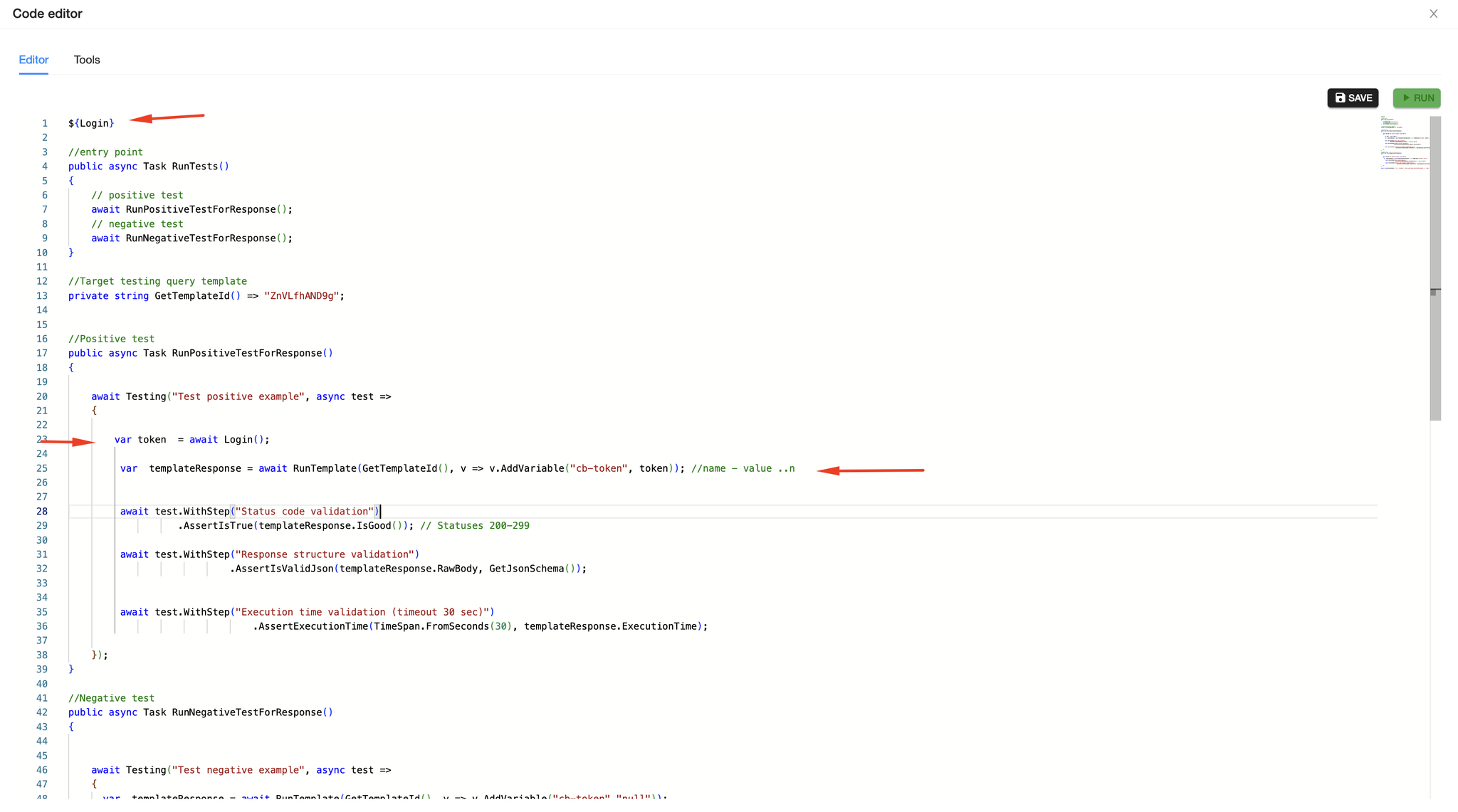
Additionally, snippets can be directly inserted into code sections as precompiled actions using the directive ${{snippetName}}. This is convenient when different tests use a common function.
File()
File is a method that returns a file attached to the current template. The input parameter is the file name or the Parameter Name assigned during attachment. The result of the method execution is an IFileModel, which has the following structure:
FileModel
c#public interface IFileModel
{
    /// <summary>
    /// Filename
    /// </summary>
    string Name { get; set; }

    /// <summary>
    /// Lenght (bytes)
    /// </summary>
    long Lenght { get; set; }

    /// <summary>
    /// File content
    /// </summary>
    byte[] Content { get; set; }

    /// <summary>
    /// Uniq id
    /// </summary>
    Guid Id { get; set; }
}
JSON Manipulation Functions
IsJson()
Purpose: Validates if a given string is a valid JSON format.
Signature:
public bool IsJson(string source)
Key Details:
Returns false if the input string is null.
Attempts to parse the string using JsonDocument.Parse.
If parsing is successful, returns true.
Catches JsonException and returns false for invalid JSON.
Ensures proper disposal of the JsonDocument in all cases.
Serialize()
Purpose: Converts an object to a JSON-formatted string using Json.NET.
Signature:
public virtual string? Serialize(object obj, Formatting formatting = Formatting.Indented)
Key Details:
Logs the serialization process, including the object's type.
Uses JsonConvert.SerializeObject with ReferenceLoopHandling.Ignore to handle cyclic references.
Returns the JSON string or null if an exception occurs.
c#var myObject = new { Name = "Dmitry", Age = 32 };

string? json = Serialize(myObject);

Log(json);

// Output:
// {
//   "Name": "Dmitry",
//   "Age": 32
// }
Deserialize()
Purpose: Converts a JSON-formatted string into an object of the specified type.
Signature:
public virtual T? Deserialize<T>(string line, JsonSerializerSettings settings = null)
Key Details:
Logs the deserialization process, including the target type and input string.
Uses Json.NET's JsonConvert.DeserializeObject for the conversion.
Supports optional custom deserialization settings via JsonSerializerSettings.
Catches exceptions during deserialization, logs the error, and returns default(T).
c#class Person
{
    public string Name { get; set; }
    public int Age { get; set; }
}

await Testing("Persons test", async test =>
{

  var response = await Query("GetPerson");

  var person = Deserialize<Person>(response.RawBody);

  Log(person);

  // Output:
	// {
  //  	"Name": "Dmitry",
  //		"Age": 32
  // }

});
JsonSchema()
Purpose: Generates a JSON schema based on a specified type.
Signature:
public virtual Task<string> JsonSchema<T>() //for the generic type
public virtual Task<string> JsonSchema(Type type) // for the specified Type
public virtual Task<string> JsonSchema(string json) //for sample JSON Data string.
Key Details:
Uses NJsonSchema to create a schema from the generic type T.
Returns the schema as a JSON string wrapped in a Task.
Catches exceptions, logs the error, and returns null.
c#class Person
{
    public string Name { get; set; }
    public int Age { get; set; }
}

var schema1 = await JsonSchema<Person>();
Log(schema1);
// Output :
//{
//  "$schema": "http://json-schema.org/draft-04/schema#",
//  "type": "object",
//  "required": [
//    "Name",
//    "Age"
//  ],
//  "properties": {
//    "Name": {
//      "type": "string"
//    },
//    "Age": {
//    "type": "integer"
//   }
// }
//}

var schema2 = await JsonSchema(typeof(Person));
Log(schema2);
// Output :
//{
//  "$schema": "http://json-schema.org/draft-04/schema#",
//  "type": "object",
//  "required": [
//    "Name",
//    "Age"
//  ],
//  "properties": {
//    "Name": {
//      "type": "string"
//    },
//    "Age": {
//    "type": "integer"
//   }
// }
//}

var schema3 = await JsonSchema(Serialize(new Person()));
Log(schema3);
// Output :
//{
//  "$schema": "http://json-schema.org/draft-04/schema#",
//  "type": "object",
//  "required": [
//    "Name",
//    "Age"
//  ],
//  "properties": {
//    "Name": {
//      "type": "string"
//    },
//    "Age": {
//    "type": "integer"
//   }
// }
//}
Output Functions
Log
Purpose: Logs a string message with a timestamp to the Statistics.Output.
Signature:
public virtual void Log(string line)
Key Details:
Prepends the message with the current UTC timestamp.
Handles null inputs by replacing them with the string "NULL".
Appends the message to the Statistics.Output property.
c#Log("Operation completed.");
// Output (in Statistics.Output):
// (UTC) 12:34:56.789 Operation completed.


//Object overload:
var person = new { Name = "Dmitry", Age = 32 };
Log(person);
// Output (in Statistics.Output):
// (UTC) 12:34:56.789 {"Name":"Dmitry","Age":32}
Test Functions
Assertions
PostuLatte provides the following assertion for test steps:
AssertAreEqual(object source, object target) | Compares two objects for equality. |
AssertIsTrue(bool source) | Checks if the specified condition is true. |
AssertIsFalse(bool source) | Checks if the specified condition is false. |
AssertExecutionTime(TimeSpan expectedTime, Task action) | Verifies that an asynchronous action completes within the expected time. |
AssertExecutionTime(TimeSpan expectedTime, Func<Task> action) | Verifies that a function executing an asynchronous task completes within the expected time. |
AssertExecutionTime(TimeSpan expectedTime, ResponseModel responseModel) | Validates that the execution time recorded in a ResponseModel is within the expected range. |
AssertExecutionTime(TimeSpan expectedTime, TimeSpan executingTime) | Checks if a given execution time meets the expected range. |
AssertIsNull(object source) | Checks if the specified object is null. |
AssertIsNotNull(object source) | Checks if the specified object is not null. |
AssertAreNotEqual(object source, object target) | Validates that two objects are not equal. |
AssertIsNotEmpty(string source) | Ensures that the provided string is not empty or null. |
AssertIsValidJson<T>(string json) | Verifies that a JSON string can be deserialized into a specified type. |
AssertIsEmpty(string source) | Ensures that the provided string is empty or null. |
AssertIsValidJson(string json, string schema) | Validates that a JSON string conforms to a specified schema. |
Fakers
The Faker method group in PostuLatte is designed to simplify the generation of realistic, mock data for testing purposes. It helps create structured, customizable data for various scenarios without the need for manual input. This ensures efficient, consistent, and reliable test setups, particularly when working with APIs or systems that require dynamic input.
Key Objectives
Data Simulation: Generate mock data that mimics real-world input, such as user profiles, orders, or configurations.
Automation: Automate the creation of single objects or collections, reducing the time spent on manual test data preparation.
Customization: Provide flexible configuration options to define how specific fields or object structures are generated.
Reusability: Enable reusable setups for commonly used mock data patterns across multiple tests.
Edge Case Testing: Facilitate the creation of edge cases, such as boundary values or invalid data, to test system robustness.
c#await Testing("Test with faker", async test =>
        {

            var  fakeUser =  test.UseFaker()
                              .Setup(fakerConfig =>
                              {
                                  /* Custom rules */

                              }).FakeObject<User>();

            var  fakeUsers =  test.UseFaker<User>()
                                                .Setup(x=>x.Rules((faker, user) =>
                                                {
                                                   /* Custom rules */

                                                })).FakeCollection<User>(10);

            var createUserResponse = await Query("QueryTemplateForSingleUser",
                                                    vars => vars.AddVariable("body",Serialize(fakeUser)));


            var createMultipleUsersResponse = await Query("QueryTemplateForMultipleUsers",
                vars => vars.AddVariable("body",Serialize(fakeUsers)));

            await test.WithStep("Single user")
                      .AssertIsTrue(createUserResponse.IsOk());

            await test.WithStep("Multiple users")
                .AssertIsTrue(createMultipleUsersResponse.IsOk());

        });
The test, named "Test with faker", generates mock data and validates API functionality.
Mock Data Generation:
Single User (fakeUser): A single User object is generated using UseFaker() with optional custom rules.
Multiple Users (fakeUsers): A collection of 10 User objects is created using UseFaker<User>() with field-specific generation rules.
API Requests:
Single User Creation: The fakeUser object is serialized and sent in a POST request using the "QueryTemplateForSingleUser" template.
Multiple User Creation: The fakeUsers collection is serialized and sent via the "QueryTemplateForMultipleUsers" template.
Validation:
Single User: The test verifies that the response for creating a single user is successful (IsOk() returns true).
Multiple Users: Similarly, the test confirms the success of the multiple user creation request.
Faker methods in PostuLatte are implemented based on the AutoBogus library, so the configuration capabilities are well-documented in the official AutoBogus documentation. In PostuLatte, a wrapper has been added to integrate the library seamlessly into PostuLatte's business processes.
Below is an example of customizing data generation rules.
c#//Custom rules can be added using the Rules method to define how each field of the object should be populated
var fakeUsers = test.UseFaker<User>()
                    .Setup(x => x.Rules((faker, user) =>
                    {
                        user.Name = faker.Person.FullName;
                        user.Email = faker.Internet.Email();
                        user.Age = faker.Random.Int(18, 60);
                    })).FakeCollection<User>(10);

// Fakers can generate nested objects as part of a parent object.
var fakeOrder = test.UseFaker<Order>()
                    .Setup(faker => faker.Rules((f, order) =>
                    {
                        order.User = f.FakeObject<User>();
                        order.Items = f.FakeCollection<Item>(5);
                    })).FakeObject<Order>();
You can invoke a faker without using the Setup method — in this case, the object will be generated using default rules based on data types. However, if you want more realistic mock objects, it is recommended to use the Setup method and configure the faker accordingly.
Test Step Management Functions
Step
The
Step method represents a logical unit of work within a test scope. It allows defining and executing individual steps as part of a larger test process, providing structure and traceability to the testing workflow.Example Usage
c#await testScope.Step("Validate user creation", async () =>
{
    var response = await Query("CreateUserQuery");
    await testScope.AssertIsTrue(response.IsOk());
});
WithStep
The
WithStep method serves the same purpose as the Step method but provides a chaining syntax, making it more convenient to use in certain situations.Example Usage
c#await testScope.WithStep("Validate user creation")
               .AssertIsTrue(response.IsOk());
Report
The
Report method is used to log and add structured entries to test reports. It provides a way to include metrics, trends, and custom messages within testing scopes.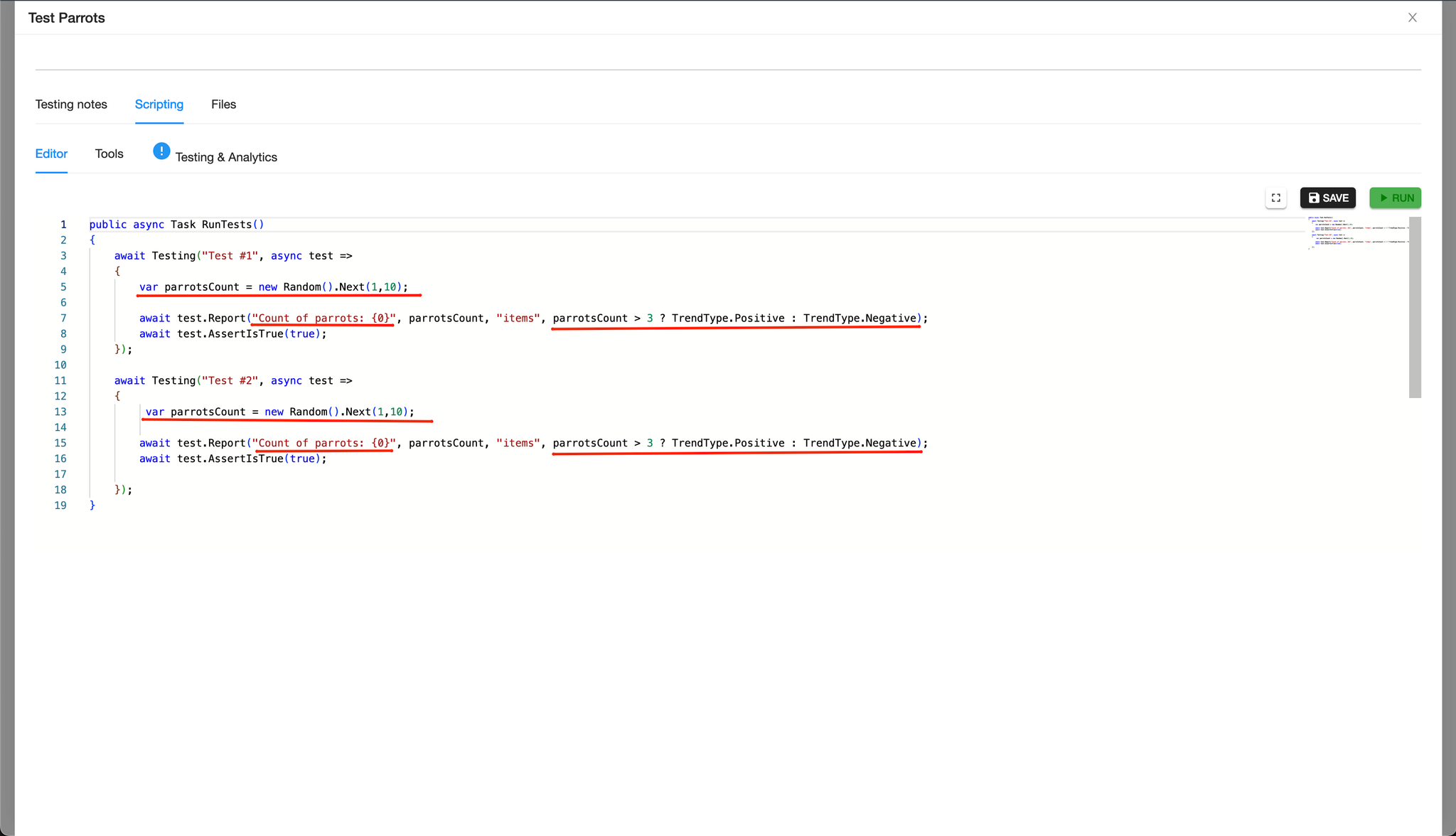
Metrics created using the
Report method are displayed in graphs and statistics of the summary reports.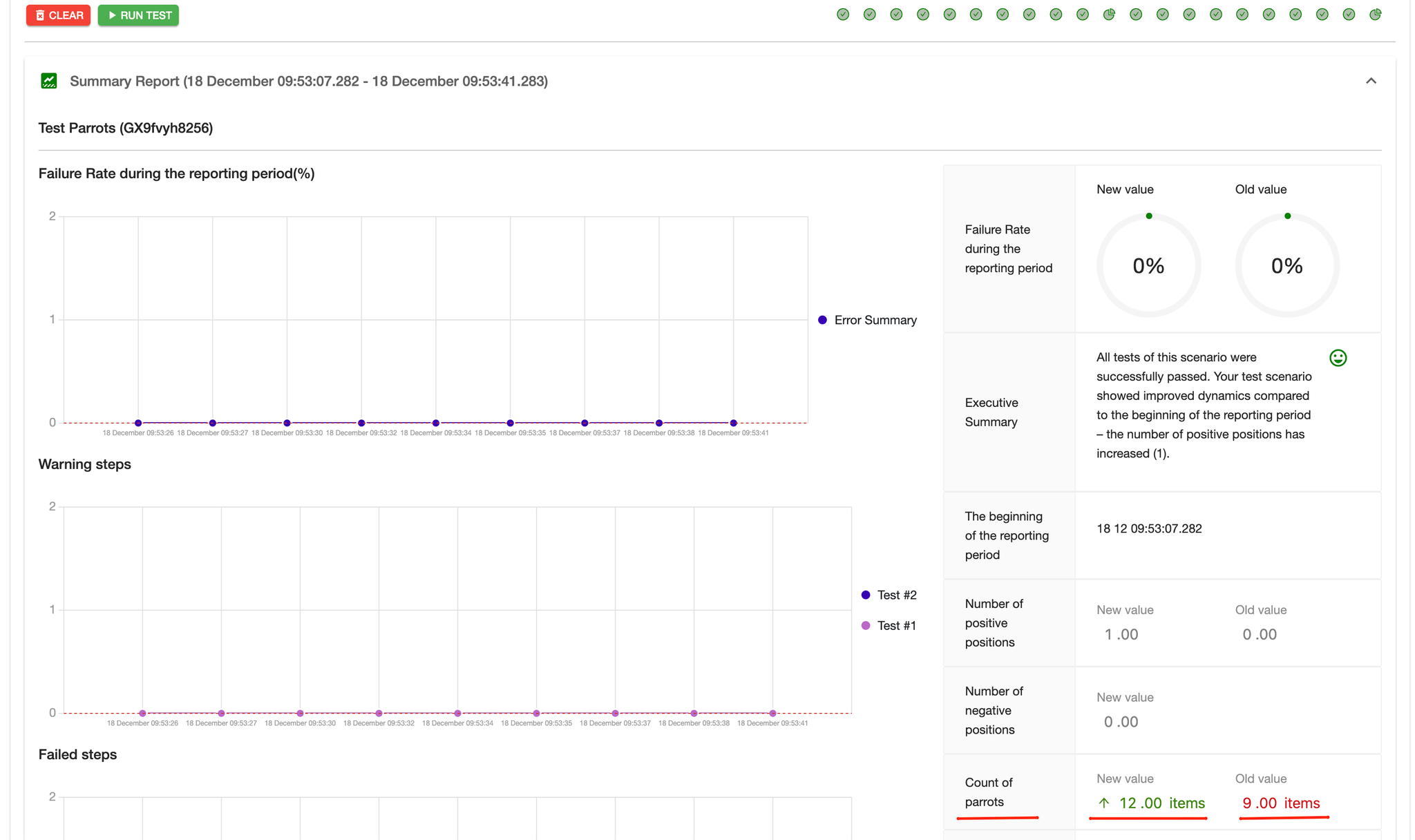
Parameters
string message- The main report message.
- Can include placeholders (e.g.,
{0}) for formatting dynamic values.
double? indicatorValue(optional)- A numeric value associated with the report entry.
- Useful for tracking metrics like execution time, step counts, or success rates.
string unit(optional)- The unit of measurement for the
indicatorValue. - Examples:
"ms"for milliseconds,"count"for steps, or any custom unit.
TrendType trendType(optional, default: Positive)- Indicates the trend associated with the value (e.g.,
Positive,Negative, orNeutral). - Helps evaluate and visualize metrics in reports.
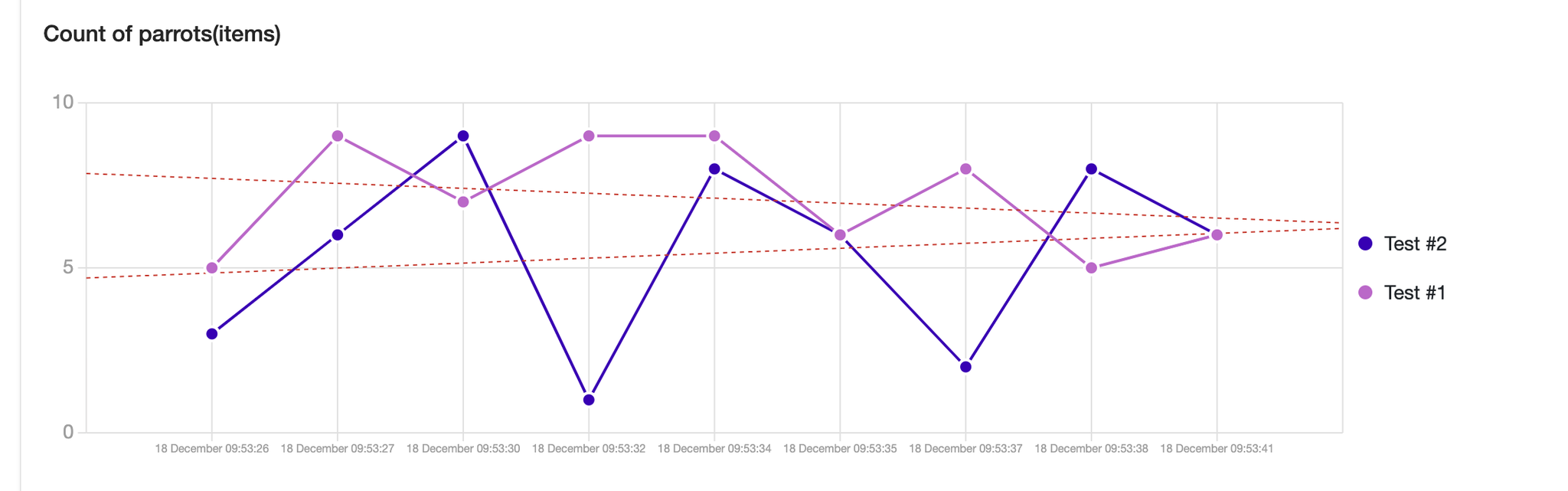
c#await testScope.Report("Execution time: {0} ms", 120, "ms", TrendType.Negative);
Fail
The
Fail method is used to explicitly mark a test step as failed. It allows for logging failure details and ensures the failure is recorded in the test report, providing traceability and clarity for debugging.c#if (!response.IsOk()) { await testScope.Fail("User creation failed: invalid response received."); }
Success
The
Success method is used to explicitly mark a test step as successful. It logs a success message and adds an entry to the test report, ensuring clarity and traceability for successful operations.c#if (response.IsOk()) { await testScope.Success("User creation succeeded: valid response received."); }
Warning
The
Warning method is used to mark a test step with a warning. It logs a warning message and adds an entry to the test report, signaling potential issues that may not cause the test to fail but require attention.c#if (response.HasWarnings()) { await testScope.Warning("User creation completed with warnings: some fields were missing."); }
ItIsCriticalTest
The
ItIsCriticalTest method marks the current test scope as critical. This indicates that any failure within the scope should be treated with higher severity and reported as a critical issue.c#await testScope.ItIsCriticalTest() .WithStep("Validate critical user creation") .AssertIsTrue(response.IsOk());